The best USB-C to Micro-B cables pair high-speed data transfer with durable build quality for external drives and mobile devices. This guide helps buyers choose cables that maximize transfer speed, compatibility, and longevity. The top picks are ideal for professionals needing quick SSD data transfers, students syncing files, or users upgrading from USB‑A to USB‑C ecosystems. The following table highlights each product and who it’s best for.
| Product | Best For |
|---|---|
| UGREEN 10 Gbps Micro B to USB C Cable | High‑speed SSD transfers and durable daily use |
| Cable Matters USB C to USB B 3.0 Cable (6.6ft) | Legacy USB‑B peripherals and long cable needs |
| Amazon Basics USB-C to Micro USB 3.1 Gen 2 | Reliable all‑around USB‑C to Micro‑B compatibility |
| Cable Matters 10Gbps Short USB C to Micro USB 3.0 (1ft) | Compact, fast transfers for portable drives |
| SUNGUY 10Gbps Micro B to USB C Cable (1ft) | Sturdy, high‑speed option for mobile and desktops |
The following sections detail five USB‑C to Micro‑B cable options. Each entry explains who will benefit most, why the cable was selected, and a practical caveat to consider before purchase.
UGREEN 10 Gbps Micro B To USB C Cable

Best For: professionals transferring large SSD files and power users who need fast data moves. This all‑in‑one cable connects a USB‑C host to a Micro‑B device for data and charging with a stated 10 Gbps transfer rate. It is ideal for external SSDs and mobile devices that tolerate Micro‑B ports.
Why selected: It combines a braided jacket and aluminum alloy connectors for durability, with shielding to minimize interference. It’s designed to endure heavy use and multiple bend cycles, supporting sustained high‑speed transfers.
Caution: Real‑world transfer speeds depend on the connected devices and settings. Some USB controllers may cap throughput below the cable’s advertised potential.
Cable Matters USB C To USB B 3.0 Cable – 6.6ft
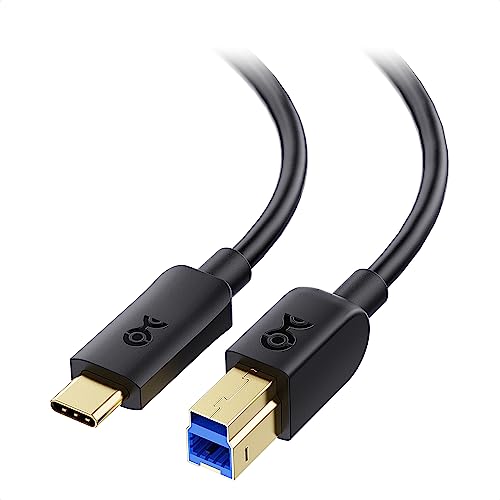
Best For: users upgrading from USB‑B peripherals or docking setups that require USB‑B 3.0 ports. This long 6.6‑foot cable supports devices with a USB‑C host and a USB‑B 3.0 peripheral.
Why selected: It enables high‑speed data transfer up to 5 Gbps, adequate for external drives and other USB‑B 3.0 accessories. The reversible USB‑C connector simplifies connection in crowded workspaces.
Caution: The length may cause more signal loss if used with very high‑speed drives across long distances or in electrically noisy environments.
Amazon Basics USB‑C To Micro USB 3.1 Gen 2 Cable

Best For: users seeking a dependable, compact cable for everyday data transfers and charging between USB‑C hosts and Micro‑B devices.
Why selected: It offers a straightforward USB‑C to Micro‑B solution with a practical length and a reversible USB‑C connector to reduce fumbling. Good for general file syncing and mobile data transfers.
Caution: The data transfer rates align with USB‑3.1 Gen 2 expectations, but not all external drives reach the maximum speed depending on device compatibility and firmware.
Cable Matters 10Gbps Short USB C To Micro USB 3.0 Cable (1ft)

Best For: travelers or desk setups needing a compact, high‑speed link between a USB‑C computer and a Micro‑B peripheral or external drive.
Why selected: This short 1‑foot cable minimizes clutter while delivering up to 10 Gbps data transfer, making it suitable for quick backups or fast file transfers in tight spaces.
Caution: The short length reduces reach; consider a longer option if you need more slack or cable management flexibility.
SUNGUY 10Gbps Micro B To USB C Cable (1ft)

Best For: users who need a robust, high‑speed link for mobile drives and mixed device ecosystems, especially where space is at a premium.
Why selected: It emphasizes durability with gold‑plated connectors, aluminum alloy shells, and a nylon braided jacket, which supports stable data transmission and long‑term use.
Caution: As with other high‑speed cables, actual speeds depend on the devices and USB controllers in use; ensure both ends support the needed USB standard to achieve top performance.
Buying Guide
What speeds should I expect?
USB‑C to Micro‑B cables with 10 Gbps or 5 Gbps ratings typically support high‑speed external drives and fast file transfers. Real‑world performance depends on the drive’s interface (SATA‑based or NVMe external), the host computer, and whether the cable’s shielding and construction minimize interference.
What length is best for my setup?
Short cables (1 ft) reduce clutter and signal loss in busy environments, while longer cables (6.6 ft) provide reach for towers or desktop setups. Choose a length that minimizes excess slack and reduces wear on the connector.
Durability and build quality matters
Look for braided jackets, aluminum connectors, and multiple shielding layers. These features improve bend resilience and signal integrity, especially in portable use or frequent unplugging scenarios.
Compatibility considerations
USB‑C hosts paired with Micro‑B devices (external HDDs, docking stations, or mobile devices) require the correct port type. Some devices support USB Power Delivery; if charging is important, verify power compatibility with your equipment.
What about non‑drive devices?
These cables also work for other USB‑C to Micro‑B peripherals. If your use case includes phones or tablets with Micro‑B ports, ensure that the device supports the same USB standard for charging and data transfer.
FAQ
- Q: Can I use these cables for data syncing with a MacBook Pro? A: Yes, when the MacBook Pro has a USB‑C port and the connected device uses a Micro‑B interface, data syncing is possible at supported speeds.
- Q: Do these cables support charging as well as data transfer? A: Most listed cables support charging on compatible devices, but charging speed may vary by device and power delivery capabilities.
- Q: Is a longer cable always slower? A: Not necessarily. Length affects signal integrity; high‑quality cables with good shielding mitigate most speed loss over moderate lengths.
- Q: Are these cables backward compatible with USB types earlier than USB 3.0? A: They are designed for USB 3.0/3.1/3.2 environments and should be backward compatible with older USB generations when the host and device support them.
- Q: Can I use these cables with external hard drives from multiple brands? A: Yes, these cables are designed to connect USB‑C hosts to Micro‑B peripherals across brands, including WD, Seagate, Samsung, and others, provided the ports align.
- Q: What should I consider before buying? A: Consider speed, cable length, build durability, and whether the device endpoints support the USB standard advertised by the cable.