Answering the common need for flexible wiring between 3-pin/4-pin PC fans, GPUs, pumps, and LEDs, these micro 4-pin connector solutions cover a range of pitch sizes and cable types. This guide helps buyers choose based on connection type, pitch, and intended use. Best for builders adding PWM control to graphics cards, best for LED projects, and best for low-profile fan/pump setups—depending on your equipment and voltage tolerance.
| Product | Brand | Pitch | Use Case |
|---|---|---|---|
| CRJ Micro 4-Pin GPU Fan Adapter Cable | CRJ Electronics | Micro PH 2.0mm | Best for connecting 3-pin/4-pin fans to GPUs for PWM control |
| 10 Pairs Mini Micro JST PH2.0mm 4Pin Cable Kit | ZSDZFYLLK | PH2.0mm 2.0mm | Best for LED strips and small electronics with JST PH 2.0mm 4-pin |
| 10 Sets Mini Micro JST SH 1.0mm 4Pin Connectors | ZSDZFYLLK | SH 1.0mm | Good for compact signal/data connections in tight spaces |
| CRJ Micro 4-Pin GPU Fan Header Adapter Cable | CRJ Electronics | Micro PH 2.0mm | Best for fans and pumps with PCIe/graphics-card headers |
| mxuteuk 20 Pairs 22 AWG JST SM 4Pin Cable Kit | mxuteuk | JST SM 4-pin, 2.0mm pitch | Best for LED strips and quick-connect LED projects |
CRJ Micro 4-Pin GPU Fan Adapter Cable — 6-Inch
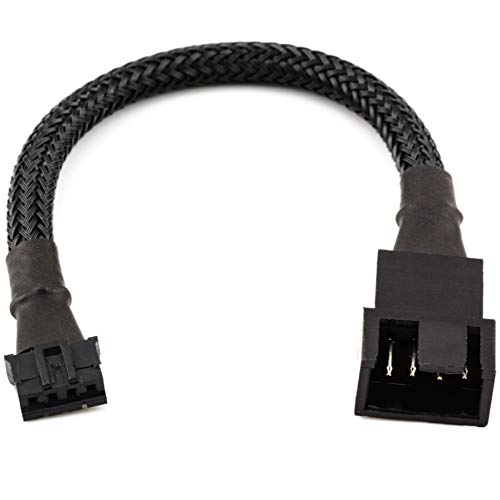
This micro 4-pin adapter lets you connect standard 3-pin and 4-pin PC fans to graphics cards and other devices. The micro PH (2.0mm) connector supports PWM speed control for graphics card fans, while 3-pin fans and devices like AIO pumps can operate at full speed if preferred. The cable is RoHS compliant and features black connectors with high-density sleeving for minimal visibility and clean cable management.
Best for: Gamers and PC builders who need PWM control from GPUs or plan to run 3-pin fans off a PWM-capable header. Limitations: 3-pin fans won’t have PWM control unless the connected device provides it.
10 Pairs Mini Micro JST PH2.0mm 4Pin Cables

These JST PH2.0mm 4-pin cables feature 2.0mm pitch, 10 cm length, and 22 AWG soft silicone tinned copper wire. They are designed as a plug-and-play kit with sturdy pins that resist loosening. Suitable for LED strips and similar projects, they offer high-temperature resistance and flexibility for tight spaces.
Best for: LED strip installations and compact electronics that require reliable JST PH 2.0mm 4-pin connections. Limitations: Not specifically tailored for high-current GPU fans; use where signal integrity and insulation are key rather than PWM control.
10 Sets Mini Micro JST SH 1.0mm 4Pin Connectors

These JST SH 1.0mm pitch connectors come with 150 mm UL1571 cable and female sockets. They are suitable for compact signal connections in small devices and hobby projects, with high-temperature resistance in the insulation.
Best for: Space-constrained projects where small 1.0mm pitch connectors are needed. Limitations: Very small pitch may complicate wiring for beginners or higher-power components.
CRJ Micro 4-Pin GPU Fan Header Adapter Cable — 12-Inch

This 12-inch cable provides a direct pass-through from a micro 4-pin fan header to a standard PC 4-pin PWM fan header. It supports fan tachometer and PWM signal for speed control, making it compatible with graphics card fans and pumps that rely on PWM.
Best for: Users needing a longer run to connect GPU fans or pumps to a PC PWM header. Limitations: Longer length can add some impedance or taper in very high-speed scenarios; ensure length suits your build.
mxuteuk JST SM 4Pin Cable Kit

Featuring 22 AWG JST SM 4-pin plugs, these cables are designed for LED strips and similar low-power devices. The kit emphasizes environmental safety, high and low temperature tolerance, and flexibility.
Best for: Quick-connecting LED projects and small electronics with JST SM 4-pin plugs. Limitations: Not ideal for high-current fans or PWM-heavy components.
DIAKLY JST MX 1.25mm 4Pin Cable Kit

This kit uses 28 AWG 4-pin JST MX plugs with a 1.25mm pitch and 150 mm length. The construction emphasizes durable PVC tinned copper wiring and a robust 4-pin pitch for LED walls, DIY projects, and small appliances.
Best for: PCB control panels, LED wall-washers, and compact hobby projects that require a precise, small-pitch connector. Limitations: Pitch is small; ensure mating connectors are compatible with your devices.
Buying Guide
Key considerations when choosing micro 4-pin connectors:
- Connector pitch: Choose a pitch that matches your device. PH2.0mm is common for GPU and fans; SH 1.0mm and MX 1.25mm offer smaller profiles for tight spaces.
- Current and voltage needs: For PWM fan control, ensure the connector supports signal lines used by the device. LEDs and low-power devices tolerate smaller wires; high-current fans require sturdier wiring.
- Cable length: Longer cables enable more flexible layouts but can add resistance. Select a length that fits your build without excess slack.
- Ease of use: Plug-and-play JST PH/SM/SH kits simplify assembly but verify polarity and color-coding to avoid miswiring.
- Durability: Look for sleeved or robust housings when cable visibility or abrasion is a concern. High-temperature insulation is beneficial for LEDs and near heat sources.
- Application fit: Use PWM-capable cables for graphics cards and motherboards; use simple signal cables for LEDs and fans that don’t require speed control.
FAQ
- What is a micro 4-pin connector best used for?
They are typically used to connect 3-pin and 4-pin fans to GPU headers, or to connect small devices like LEDs and pumps that require compact, multi-pin connections.
- Can 3-pin fans be controlled via PWM with these adapters?
Yes, but PWM control depends on the connected device and header, not all 3-pin fans will receive PWM signals.
- What does pitch mean in these cables?
Pitch is the center-to-center distance between adjacent pins. Smaller pitches save space but may be harder to work with.
- Are these cables RoHS compliant?
Some models indicate RoHS compliance; verify the product listing for RoHS status if this is important to you.
- Which option is best for LED strips?
JST PH 2.0mm and JST SM 4-pin cables are common choices for LED strips and related projects due to their compact size and reliable connections.
- Should I choose longer cables for GPU fan connections?
Longer cables provide flexibility in routing but may introduce minor impedance; pick a length that fits your chassis layout while keeping signal integrity.